Dec 12, 2014

CCBoot 3.0 : Server Hardware Requirements

Here is the recommended server hardware for diskless boot with CCBoot.

1.] CPU: Intel or AMD Processor 4 Core or more.
2.] Motherboard: Server motherboard that supports 8GB or more RAM, 6 or more SATA Ports.
3.] RAM: 8GB DDR3 or more.
4.] Hard Disk:At first, we introduce some items.
Image disk: the hard disk that stores the client OS boot data. We call it as "image".
Game disk: the hard disks that store the game data.
Writeback disk: the hard disks that store the client write data. In diskless booting, all data are read and wrote from server. So we need writeback disk to save the client's write data. Other products are also named it as "write cache".

1) One SATA HDD is used for server OS (C:\) and image disk(D:\); some users put image file into SSD disk. It's not necessary. We have RAM cache for image. All image data will be loaded from RAM cache at last. So put image file into SSD disk is not necessary.

2) Two SATA HDD are set up on RAID0 for Game Disk.
We recommend to use Win2008 disk manager to setup RAID0 instead of hardware RAID in BIOS. We recommend to set SATA mode as AHCI in BIOS. Because AHCI is better for writeback disks' write performance. For more information, please refer to AHCI on wiki. In the BIOS, SATA mode can only be one of AHCI and RAID. If we set it as AHCI, the RAID function of the motherboard will be invalid. So we use Win2008 disk manager to setup RAID0. The performance is same as hardware RAID0. Note: If you skip RAID0, the read speed of the game may become slow. But if the clients are less than 50 with SSD cache, it is OK to skip RAID0.

3) One SSD disk for SSD cache. (120G+)

4) Two SATA/SAS/SSD HDD is used for client write-back disk. We do NOT recommend to use RAID for write-back disks. If one disk is broken, we can use the other one. If using RAID for writeback disk, one disk broken will cause all clients stop. On the other hand, CCBoot can do balance for writeback disk. Two disks write performance is better than one RAID disk. Using SSD as writeback disk is better than SATA. SSD has good IOPS. The street said the writing activities are harmful for the lifetime of SSD. In our experience, one SSD for writeback disk can be used for three years at least. It's enough and worth.

Conclusion: You need to prepare 6 HDDs for the server normally. They are 5 SATA HDDs and 1 SSD HDD. 1 SATA for system OS, 2 SATA for game disks, 2 SATA for writeback disks and 1 SSD for cache.

For 25 - 30 client PCs, server should have 8G DDR3 RAM and two writeback disks.
For 30 - 70 client PCs, server should have 16G DDR3 RAM and two writeback disks.
For 70 - 100 client PCs, server should have 32G DDR3 RAM and two writeback disks.
For 100+ client PCs, we recommend to use 2 or more Servers with load balance.
Network: 1000Mb Ethernet or 2 * 1000 Mb Ethernet team network. We recommend Intel and Realtek 1000M Series.
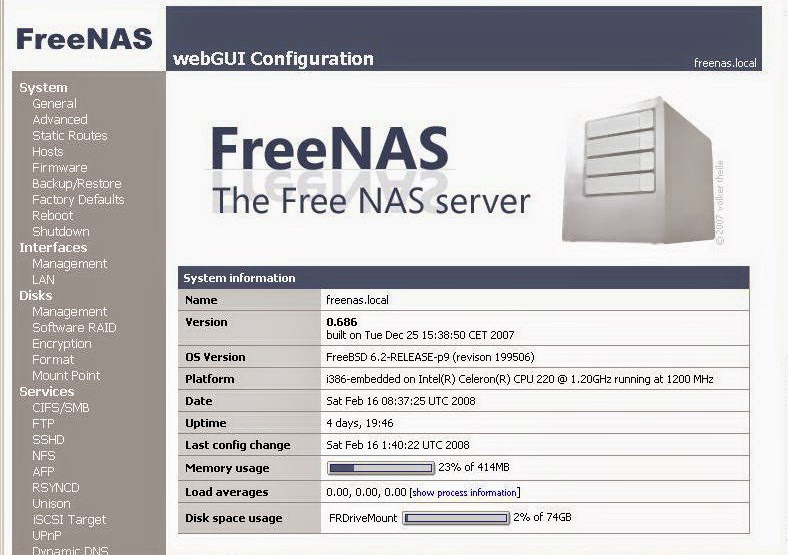
FreeNAS : How-To Setup Home File Server For Free

I download a lot of music. My wife takes a lot of digital photos. My kids also like to save music and photos. Between all of us, we have a lot of media that quickly accumulates on our home PCs. The task of sharing this media between us is a challenge. My wife didn't know how to burn data CDs and my kids didn't have a CD burner. What we needed was a home file server: A dedicated computer used storage and sharing of our files. My research found a ton of products available that would do the job. There are several dedicated Network Attached Storage (NAS) devices that I could purchase, but even the cheapest ones are still several hundred US dollars. Then there is the server software to consider. Microsoft has its Windows Storage Server software that is also several hundred US dollars. There is also many different Linux solutions that require a working knowledge of the linux file system and command line.


In the end I settled on a free product called FreeNAS. As the title suggests, FreeNAS is free network attached storage software, but that is not all. It also has numerous features that make it extremely easy to set up, manage and expand. Plus it has features that allow you to use it as a media server for various devices. Since its hardware requirement is very minimal, this seemed like an ideal product for me to use. With FreeNAS, I was able to use my old desktop PC (a Pentium 4 with 256 MB RAM), as my file server.

Installation and setup:

To set up FreeNAS as a home file server, you must make sure you have all the proper hardware first. This means you need a multiple port router, or switch to connect your file server to as well as a network cable for the server. For the actual server, you will need a PC with at least one hard drive (I started with 2) and a CD-ROM drive.

The setup process was very easy. I downloaded the FreeNAS ISO file and created a Live CD which I inserted into my old PC. If I wanted to, I could have started using it as a file server right there (by simply changing the IP address of the server), but I wanted something that I could use in the long term... something that could auto restart with no user intervention in the event of a power failure. This meant installing it to the hard drive. FreeNAS setup made this easy to do. I simply selected which hard drive to install to, and that was it. After a reboot, I had to set up the network interface. FreeNAS auto-detects which network adapter you have, so selecting it was simple. Next I had to assign an IP address. FreeNAS setup has a default address you can use if you want, but it may not work on your home network. Its best to find out your workstation's IP address (typically assigned by your ISP through DHCP) and set up your FreeNAS server on a similar address. Once this is done, you are pretty much done with working directly with that machine and can now access all your other options through the web interface, which I found very easy to use.

Setting up file shares:

This is probably the most challenging part of the entire setup, but it was still relatively easy to do. Setting up the server to share files is done in 4 steps: Adding a drive, formatting the drive, adding a mount point, then setting up the share. At first the task was a bit daunting, but after grasping the basic concept, it was really quite straight forward. When I added 2 more hard drives to my server, it was simple to configure them for file sharing and within 15 minutes, I had easily tripled my file server storage capacity.

Additional Features:

Even though storage is its primary feature, there is much more that really makes this product shine. It has the ability to support multiple network protocols, including AppleTalk, NFS, FTP, Unison, and iSCSI. It also comes bundled with many extra services like the Transmission Bittorent client, a UPnP server, iTunes server and a basic web server. This means that it is capable of more than just storage. It can be used as part of your home entertainment setup, serving your media to your Home Theater PC, PSP, iPod, or other network devices.

Conclusion:

I'm happy to say that FreeNAS does a great job storing and sharing my files. Since my initial installation of the product, I added and updated 3 hard drives on my server and the process was very easy and straight forward. FreeNAS easily recognized my new hard drives and allowed me to add and share them for storage with no problems. I use the Transmission Bittorrent client to download my media, so I am not tying up my workstation with a separate bit torrent client. If I decide later to add a Linux PC to my home network, I can simply enable the appropriate protocol on my server and have instant access to all my files. Ultimately my goal is to build a home theater PC, so when that is ready, I will already have the media server ready to serve up my media.

I heartily recommend FreeNAS if you are looking for a free (or very inexpensive) solution for a file server. You will need to know some basic technical information about your home network, like your IP address setup, and you will need to have a multiple port router or switch on your home network, but beyond that, it is relatively easy to manage and expand.

Resources:

Website: http://www.freenas.org/
Download: http://sourceforge.net/projects/freenas/files/
Installation instructions: http://www.installationwiki.org/Installing_FreeNAS
FreeNAS Blog: http://blog.freenas.org/
FreeNAS Knowledgebase: http://www.freenaskb.info/kb/
FreeNAS Support Forum: http://sourceforge.net/apps/phpbb/freenas/index.php

Yet Another AoE vs. iSCSI Opinion

That’s right, folks! Yet another asshole blogger here, sharing his AoE (ATA over Ethernet) vs. iSCSI (Internet SCSI) opinion with the world!

As if there wasn’t already enough discussion surrounding AoE vs. iSCSI in mailing lists, forums and blogs, I am going to add more baseless opinion to the existing overwhelming heap of information on the subject. I’m sure this will be lost in the noise but after having implemented AoE with CORAID devices and iSCSI with an IBM (well, LSI) device and iSCSI with software targets in the past I feel I finally have something share.

This isn’t a technical analysis. I’m not dissecting the protocols nor am I suggesting implementation of either protocol for your project. What I am doing is sharing some of my experiences and observations simply because I can. Read on, brave souls.

Background

My experiences with AoE and iSCSI are limited to fairly small implementations by most standards. Multi-terabyte and mostly file serving with a little bit of database thrown in there for good measure. The reasoning behind all the AoE and iSCSI implementations I’ve setup is basically to detach storage from physical servers to achieve:
  1. Independently managed storage that can grow without pain
  2. High availability services front-end (multiple servers connecting to the same storage device(s))
There are plenty of other uses for these technologies (and other technologies that may satisfy these requirement), but that’s where I draw my experiences from. I’ve not deployed iSCSI or AoE for virtual infrastructure which does seem to be a pretty hot topic these days, so if that’s what you’re doing, your mileage will vary.

Performance

Yeah, yeah, yeah, everyone wants the performance numbers. Well, I don’t have them. You can find people comparing AoE and iSCSI performance elsewhere (even if many of the tests are flawed). Any performance numbers I may accidentally provide while typing this up in a mad frenzy are entirely subjective and circumstantial… I may not even end up providing any! Do you own testing, it’s the only way you’ll ever be sure.

The Argument For or Against

I don’t really want to be trying to convince anyone to use a certain technology here. However, I will say it: I lean towards AoE for the types of implementations I mentioned above. Why? One reason: SIMPLICITY. Remember the old KISS adage? Well, kiss me AoE because you’ve got the goods!

iSCSI has the balls to do a lot, for a lot of different situations. iSCSI is routable in layer 3 by nature. AoE is not. iSCSI has a behemoth sized load of options and settings that can be tweaked for any particular implementation needs. iSCSI has big vendor backing in both the target and the initiator markets. Need to export an iSCSI device across a WAN link? Sure, you can do it, never mind that the performance might be less than optimal but the point is it’s not terribly involved or “special” to route iSCSI over a WAN because iSCSI is designed from the get-go to run over the Internet. While AoE over a WAN has been demonstrated with GRE, it’s not inherent to the design of AoE and never will be.

So what does AoE have that iSCSI doesn’t? Simplicity and less overhead. AoE doesn’t have myriad of configuration options to get wrong, it’s really so straight forward that it’s hard to get it wrong. iSCSi is easy to get wrong. Tune your HBA firmware settings or software initiator incorrectly (and the factory defaults can easily be “wrong” for any particular implementation) and watch all hell be unleashed before your eyes. If you’ve ever looked at the firmware options provided to by QLogic in their HBAs and you’re not an iSCSI expert, you’ll know what I’m talking about.

Simplicity Example: Multipath I/O

A great example of AoE’s simplicity vs. iSCSI is when it comes to multipath I/O. Multipath I/O is defined as utilizing multiple paths to the same device/LUN/whatever to gain performance and/or redundancy. This is generally implemented with multiple HBAs or NICs on the initiator side and multiple target interfaces on the target side.

With iSCSI, every path to the same device provides the operating system with a separate device. In Linux, that’ll be /dev/sdd, /dev/sde, /dev/sdf, etc. A software layer (MPIO) is required to manage I/O across all the devices in an organized and sensible fashion.

While I’m a fairly big fan of the latest device-mapper-multipath MPIO layer in modern Linux variants, I find AoE’s multipath I/O method much, much better for the task of providing multiple paths to a storage device because it has incredibly low overhead to setup and manage. AoE’s implementation has the advantage that it doesn’t need to be everything to every storage subsystem, which fortunately or unfortunately device-mapper-multipath has to be.

The AoE Linux driver totally abstracts multiple paths in a way that iSCSI does not by handling all the multipath stuff internally. The host is only provided with a single device in /dev that is managed identically to any other non-multipath device. You don’t even need to configure the driver in any special way, just plug in the interfaces and go! That’s a long shot from what is necessary with MPIO layers and iSCSI.

There’s nothing wrong about device-mapper-multipath and it is quite flexible, but it certainly doesn’t have the simplicity of AoE’s multipath design.

Enterprise Support

Enterprise support is where iSCSI shines in this comparison. Show me a major storage vendor that doesn’t have at least one iSCSI device, even if they are just rebranded. Ok, maybe there are a few vendors out there without an iSCSI solution but for the most part all the big boys are flaunting some kind of iSCSI solution. NetApp, EMC, Dell, IBM, HDS and HP all have iSCSI solutions. On the other hand, AoE only has only a single visible company backing it at the commercial level: CORAID, a spin-off company started by Brantley Coile (yeah, the guy who invented the now-Cisco PIX and AoE). I’m starting to see some Asian manufacturers backing AoE on the hardware level but when it comes to your organization buying rack mount AoE compatible disk trays, CORAID is the only vendor I would suggest at this time.

This isn’t so fantastic for getting AoE into businesses but it’s a start. With AoE in the Linux kernel and Asian vendors packing AoE into chips things will likely pickup for AoE from an enterprise support point of view: It’s cheap, it’s simple and performance is good.

Conclusion

AoE rocks! iSCSI is pretty cool too, but I’ve certainly undergone much worse pain working with much more expensive iSCSI SAN devices vs the CORAID devices. And no performance benefit that I could realize with moderate to heavy file serving and light database workloads. I like AoE over iSCSI but there are plenty of reasons not to like it as well.

ATA-over-Ethernet vs iSCSI

Every so often someone voices interest in ATAoE support for Solaris or tries to engage in an ATAoE versus iSCSI discussion. There isn't much out there in the way of information on the topic so I'll add some to the pot...

If you look just at the names of these two technologies you can easily start to equate them in your mind and start a running mental dialog reguarding which is better. But, most folks make a very common mistake.. ATA-over-Ethernet is exactly that, over ethernet. Whereas iSCSI is Internet SCSI, or as some people prefer to think SCSI over IP. So we've got two differentiators just given the names of these technologies alone: ATA vs SCSI command set, and Ethernet vs IP stack. The interesting thing is the latter discussion.

There is a natural give and take here. The advantage of ATAoE is that you don't have the overhead of translating ATA to SCSI then back to ATA if your using ATA drives, so there is a performance pickup there. Furthermore, because we don't have the girth fo the TCP/IP stack underneight we don't burden the system with all that processing, which adds even more performance. In this sense, ATAoE strips away all the stuff that gets in the way of fast storage over ethernet. But, naturally, there is a catch. You can't route ethernet, thats what TCP/IP is for. That means that with ATAoE your going to be building very small and localized storage networks on a single segment. Think of a boot server which operates without TCP/IP, you've got to have one per subnet so that it see's the requests.

iSCSI on the otherhand might be burdened by the bulk of the TCP/IP stack, however it has the ability to span the internet because of it. You can have an iSCSI target (server) in New York and an iSCSI initiator (client) in London connected across a VPN and its not a problem. Plus, iSCSI is an open and accepted standard. ATAoE on the otherhand is open but it was created and developed by Coraid who also happens to be the only supplier of ATAoE enclosures. That may change, but we'll see how well it catches on.

ATAoE promises to be smaller and faster than the industry standard iSCSI, and it is, but unless you are using a very local application your going to be in trouble. Not to mention the lack of enclosure and driver support for non-Linux systems.

The question then becomes: Should OpenSolaris support ATAoE? Personally, I don't think we should ever be against the idea of anything new, if someone wants to do it, we should all get behind it. But looking at Solaris I doubt the idea would stick. First and foremost Solaris is an OS that adheres to the standards and plays by the rules, even when its painful. Linux doesn't always play by those rules and often it gains from breaking them. Linux is a great experimental platform, no doubt, but I just don't think the ideals of ATAoE mesh well with the goals of Solaris. Furthermore, ATAoE doesn't offer the level of scalability, flexablilty, and managability that we get with iSCSI. The performance hit of TCP/IP is definately a downside, but the advantages it brings to the table far out weight the downsides I think.

Here are some links to help you explore the subject more on your own:

ATA over Ethernet a ‘strict no’ in Data Center Networks

While exploring for storage networking technologies, there are chances that one can come across ATA over Ethernet (ATAoE). It is nothing but, ATA command set transported directly within Ethernet Frames. ATA over Ethernet approach is similar to that of a Fibre Channel over Ethernet (FCoE), but in reality the former has gained fewer acceptances from the industry.

As a matter of fact, ATAoE is limited to a single vendor (Vendor lock-in) and its specifications reveal that its protocol length is limited to 12 pages when compared with iSCSI, which has a 257 pages length of protocol.

Although, ATA over Ethernet was considered as an unsighted fast technology, it got overshadowed by the virtues of the iSCSI in the long run.

Storage networking specialists go with the opinion that ATAoE protocol is broken and so it is not a good recommendation to be deployed in the data centers. In order to further cement this statement, let us go into further details.
  • ATA over Ethernet has no sequencing- This protocol doesn’t support single sequence of numbers, which allow the storage arrays and servers to differentiate between requests or split a single request into numerous Ethernet frames. As a result of no sequencing, ATAoE offers its server the facility to go for a single request with a particular storage array.
  • ATAoE offers zero transmission- This protocol has no packet loss detection or recovery mechanism.
  • No fragmentation- ATA over Ethernet requests fit directly into Ethernet frames and so the fragmentation of a single request into multiple frames is not possible. As a result the achievement of data flow is almost zero. With the use of jumbo frames, the transfer of only two sectors is possible via each request.
  • Authentication is nil- This protocol if proposed for use in data centers, will not have authentication. So, as a result there is no network security in this protocol and so non-routability of AoE is a source of inherent security.
  • Asynchronous writes have weak support- Due to the absence of retransmissions and sequencing, asynchronous writes are handled in an in-considerate fashion.
The final word is that this protocol would have worked almost 30 years ago, when TFTP-Trivial file transfer protocol was designed. But now, in the present world, it will simply be treated as a broken protocol design class.

According to analysis of industry specialists, just go on with an ATAoE protocol to build a home network. For mission critical data center applications, ATA over Ethernet is a ‘strict no’.